Easily view & share
your family tree.
Upload a GEDCOM file and see your whole family tree: every birthplace on an interactive map, and the same people as pedigree, fan, and lifespan charts. Share it with a link, or embed it on your website. Viewers don’t need an account.
…or drag a .ged file anywhere onto this page.
Your file is read once and thrown away. Nothing is stored unless you save it. Read more.
Map it. Chart it. Share it.
- Map every place Every birthplace on an interactive map, with death and marriage places too. Click a pin to see who was there.
- Tree, fan, and lifespan The same people as a pedigree chart, a fan chart, or a lifespan. See how everyone connects and who lived at the same time.
- Share your tree Share a link anyone can open, or embed your tree on a website. Nothing is public until you choose.
Explore the map
Map every birthplace, death, and marriage.
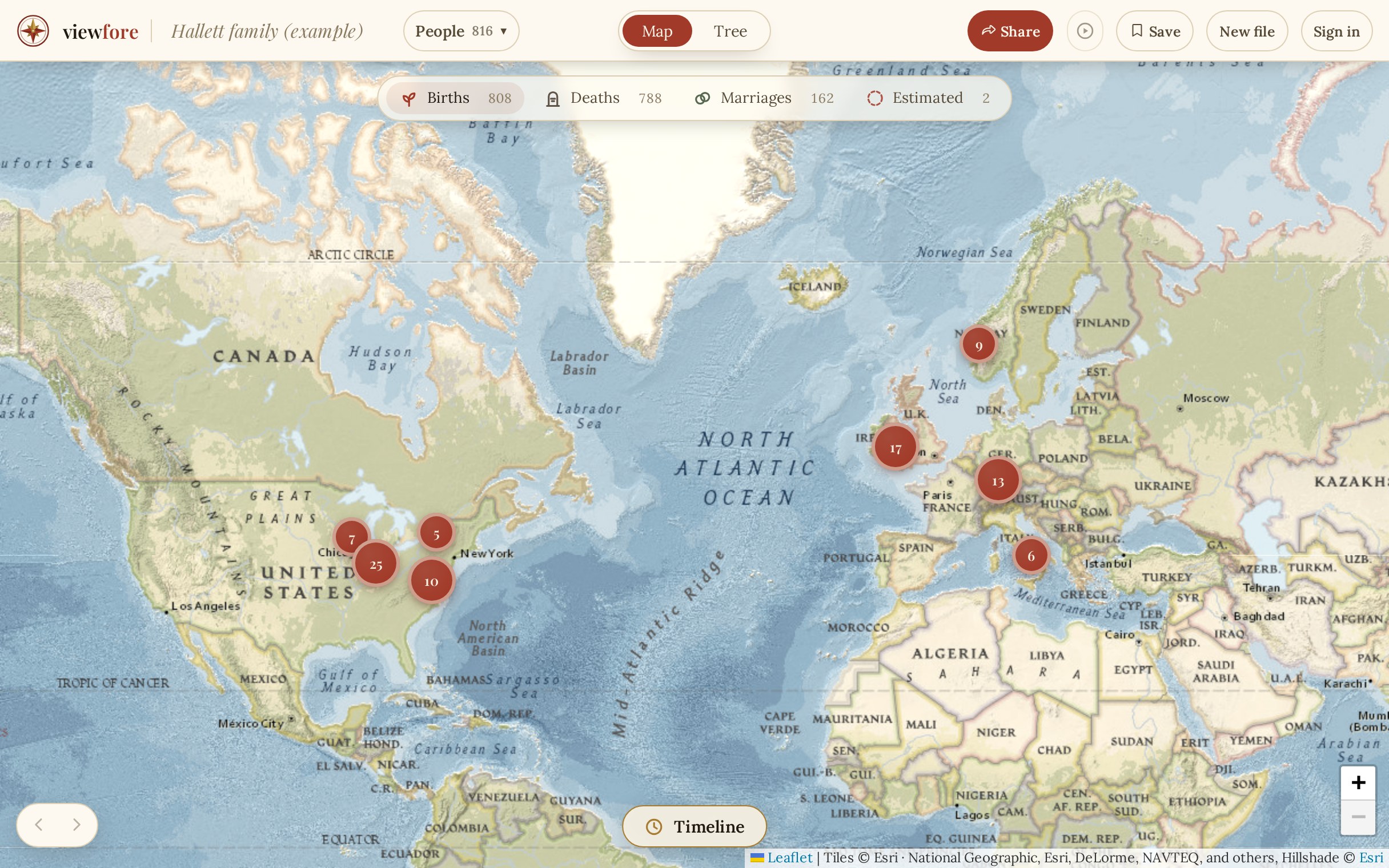
Every birthplace appears on a real map. Add death and marriage places too. Click any pin to see who was born there.
How it works
Three simple steps.
-
Upload a GEDCOM
Export a
.gedfile from Ancestry, MyHeritage, FamilySearch, or any genealogy app. Drop it on the page. Nothing to install. -
View your tree
See your whole tree four ways: a map, a pedigree chart, a fan chart, and a lifespan view. Every person in your file, never capped.
-
Share it
Share your tree as a link anyone can open, or embed it on your website with one line of code. Password-protect it or hide living people if you like.
Privacy
What happens to your file.
When you upload
Your file is read on our server to work out places, dates, and relationships, streamed back to your browser, and discarded. Places are matched against our own copy of public geographic data, so your tree is never sent to an outside service. We never build a searchable database of the people in your tree.
If you choose to save or share
The only trees we keep are the ones you save or share from your own account, as your original file. A saved tree is visible only to you. A shared link can be password-protected and switches off when you say. Living people are hidden on public shares by default, on the server. Shared trees are kept out of search engines. Delete a tree, or your whole account, whenever you like.
A public link is public. Everything above is there so you decide who sees what. Read the full privacy policy.
What you'll see
One file. Five views.
Everything below uses the built-in example, a fictional family of about 850 people. Click to try it yourself.

Every birthplace on the map
Your whole file lands on a real map. Birthplaces show by default, with death and marriage places a click away. Click any pin to see everyone born there, then move from person to person.
- A timeline plays through the years, one year at a time.
- People with no recorded birthplace get an estimated country, marked as an estimate.

Move through the whole tree
Click anyone to center the chart on them. You see their card, their closest relatives, and a line tracing their ancestors and descendants. Expand a family and the chart grows in place.
- Every blood relative is named, even a “7th cousin twice removed.”
- Five layouts, from a tidy tree to a click-to-explore mode.

Five generations at once
A round pedigree with you at the center and your parents and grandparents fanning outward. Click any ancestor to recenter the fan on them. Widen the sweep, add rings, and go as deep as your records allow.
- Hover any ancestor to see how they relate to the person at the center.
- Names curve along the rings, so every generation stays readable.

See who lived at the same time
Every life is a bar on one shared axis of years, grouped by generation. You can see who overlapped, like a great-grandmother and a grandchild, and who never met at all.
- Ancestors sit above, descendants below, each generation in its own band.
- Each bar carries the person’s relationship to the center, like “great-aunt.”

Your tree by the numbers
One page of totals and charts for the whole file: how many people, how many generations, and how many years it spans. Births by period, age at death, average lifespan, and age at first marriage.
- Ledgers of the most common surnames and birthplaces.
- Click a record holder, like the longest-lived person, to open their card.
Pricing
Free to view. Pay only to share.
View your tree
Free
always, no account needed
- Upload your whole family tree
- Map, pedigree, fan, and lifespan views
- Save it privately to your account
- Nothing is public until you choose
Share your tree
$39/year
or $10 for a 30-day share
- Publish a public link anyone can open
- Embed it on your website
- Password-protect it or hide living people
- Update your tree anytime, same link
Viewers never pay and never sign in. You pay only to publish.
Start with your own family tree.
Viewers never pay, never sign in. Works with exports from Ancestry, MyHeritage, FamilySearch & more.